

west.cn EasySLB Load Balancing Has Arrived
One-click web clusters with simple, intelligent load balancing
- Easier Deployment
- Clearer Monitoring
- Smarter Failover
 EasySLB Load Balancing
west.cn EasySLB automatically distributes application traffic across multiple cloud servers. It switches over automatically when a fault occurs, improving service availability and resource utilization.
How do I activate load balancing? Read the detailed tutorialAdvantages of west.cn Load Balancing

Balanced Traffic
Supports HTTP and TCP and distributes business traffic to backend servers according to forwarding rules.

Health Checks
Checks backend server health according to configured rules, automatically isolates unhealthy servers, and quickly switches traffic away from faulty servers to maintain availability.

Session Persistence
Session persistence is enabled by default. Users from the same IP are automatically scheduled to the same backend server, preserving session information for applications that use sessions.

Monitoring Data
Provides new connections per second and inbound/outbound bandwidth at the load balancer level, plus connections per second and inbound/outbound bandwidth for each backend server.

Simple Configuration
Add backend servers in the console with one click. Routes and gateways are configured automatically, making it easy to build a load balancing cluster.

Low Cost
Costs less and is easier to use than traditional solutions, with no expensive hardware procurement or ongoing device maintenance.
west.cn Load Balancing Activation and Management

Activate web and file servers
Activate Now>>
Activate a load balancer
Select the Load Balancing template during activation

Manage load balancer servers
What Is Load Balancing?
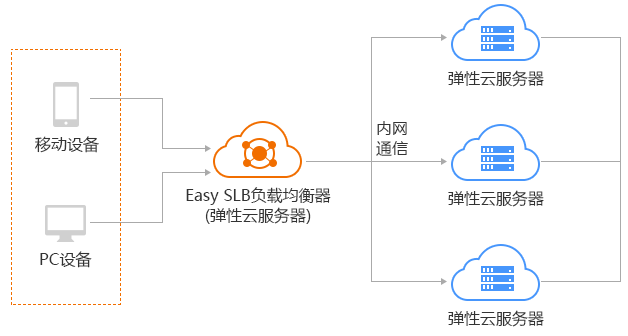
Built on the existing network structure, load balancing provides an inexpensive, effective, and transparent way to expand network device and server bandwidth, increase throughput, strengthen network data processing, and improve network flexibility and availability.
Load balancing distributes work across multiple operating units, such as web servers, FTP servers, mission-critical enterprise application servers, and other critical-task servers, so they complete work together.
Use Cases
Improve Service Availability
Multiple servers are commonly deployed to improve availability. Cloud servers work with EasySLB to provide high availability without application changes. EasySLB checks backend health, automatically isolates unhealthy instances, and switches over quickly. When an instance recovers, it automatically returns to the load balancing pool.
Seamless Scaling
Services are provided through the load balancer's virtual IP. Add servers to the backend pool as demand increases and remove them as demand falls. Because the virtual IP remains unchanged, scaling does not affect callers or visitors.
Problems Solved
A single server can no longer support a large website. A multi-server cluster provides load balancing and reduces single-server failures. If one or two web servers in the cluster fail, the website remains accessible.
Based on the cloud computing platform, load balancing is an advanced service that expands application server capacity, increases throughput, strengthens data processing, and improves application flexibility and availability.
Case Study
The west.cn website previously used a single-server solution and frequently experienced high load and slow access reported by customers. Data loss from disk damage was also a concern. It now uses a cloud architecture with two file cloud servers in primary/standby mode, a cluster of ten web cloud servers, two SQL Server 2008 database servers in primary/standby mode with real-time mirrored backups, and two load balancer cloud servers in primary/standby mode. Customer requests are distributed across the ten web servers. If one fails, requests are automatically forwarded to healthy servers within ten seconds. The cloud architecture has significantly improved system speed and data security. Data is hosted in a telecom data center, while intelligent CDN technology addresses slow access for China Unicom customers.
Recommended Configuration
Recommended individual server configurations are as follows (six servers are recommended, and web servers can be added dynamically according to load):
- One file server with a large hard disk
- One load balancing server with ample bandwidth
- One to two database servers with high memory and CPU configurations
- Three to five web servers, each requiring only 1 Mbps of public bandwidth
EasySLB Service Standards
| Service Period | Service Content | Price | |
|---|---|---|---|
| Basic Service | 0 | Basic, limited consultation services | 0 |
| Bronze Service | Within three days of purchase | 1. The customer follows tutorials to build the solution, with basic technical support during setup, such as website creation and file sharing. 2. MySQL database optimization and diagnosis of slow or stalled access are not included. | ¥1000/session/3 days |
| Silver Service | Within seven days of purchase | 1. Build according to our EasySLB architecture and set up one website and one MySQL database, then test normal operation. 2. MySQL database optimization is included. 3. Diagnosis of EasySLB slowdowns or stalls is not included. | ¥5000/session/7 days |
| Gold Service | Within fifteen days of purchase | 1. Build according to our EasySLB architecture by default, with the best architecture discussed according to customer requirements. Set up one website and one MySQL database. 2. MySQL database optimization is included. 3. Diagnosis of EasySLB slowdowns or stalls is included, with a solution provided. | ¥10000/session/15 days |
| Individual EasySLB Service Standards | |||
| Service Content | Price | ||
| EasySLB setup, including one website, file sharing, and one MySQL database | ¥2000/session/one day | ||
| MySQL database bottleneck diagnosis, solution proposal, and resolution | ¥3000/session/one day | ||
| Comprehensive EasySLB slowdown and stall diagnosis, solution proposal, and resolution | ¥5000/session/one day | ||